
Software Factory fundamentals
Implement automation
Customize how an agent changes code and creates a reviewable pull request.The Implement automation converts an approved task into a branch and pull request. Customize it to choose the coding agent, repository instructions, validation commands, artifact handling and failure behavior for your codebase.
Shape the agent around the repository
Section titled “Shape the agent around the repository”The task says what must change. Repository instructions say how work is done here. Include the commands, conventions and boundaries that a contributor needs to follow.
Configure the agent with:
- the target repository and base branch
- the task description and attached analysis
- project instructions such as
AGENTS.mdor contribution guidance - the build, test and lint commands relevant to the change
- files or directories that must not change
- the required output such as a commit, branch and pull request summary
Browse coding agents and AI to choose a supported provider. Choose the model for the complexity of the task rather than the name of the stage.
Keep repository actions explicit
Section titled “Keep repository actions explicit”Use source-control components to find, create or update the pull request after the agent runs. Attach the branch and pull request to the task so Verify receives durable links instead of extracting them from agent prose.
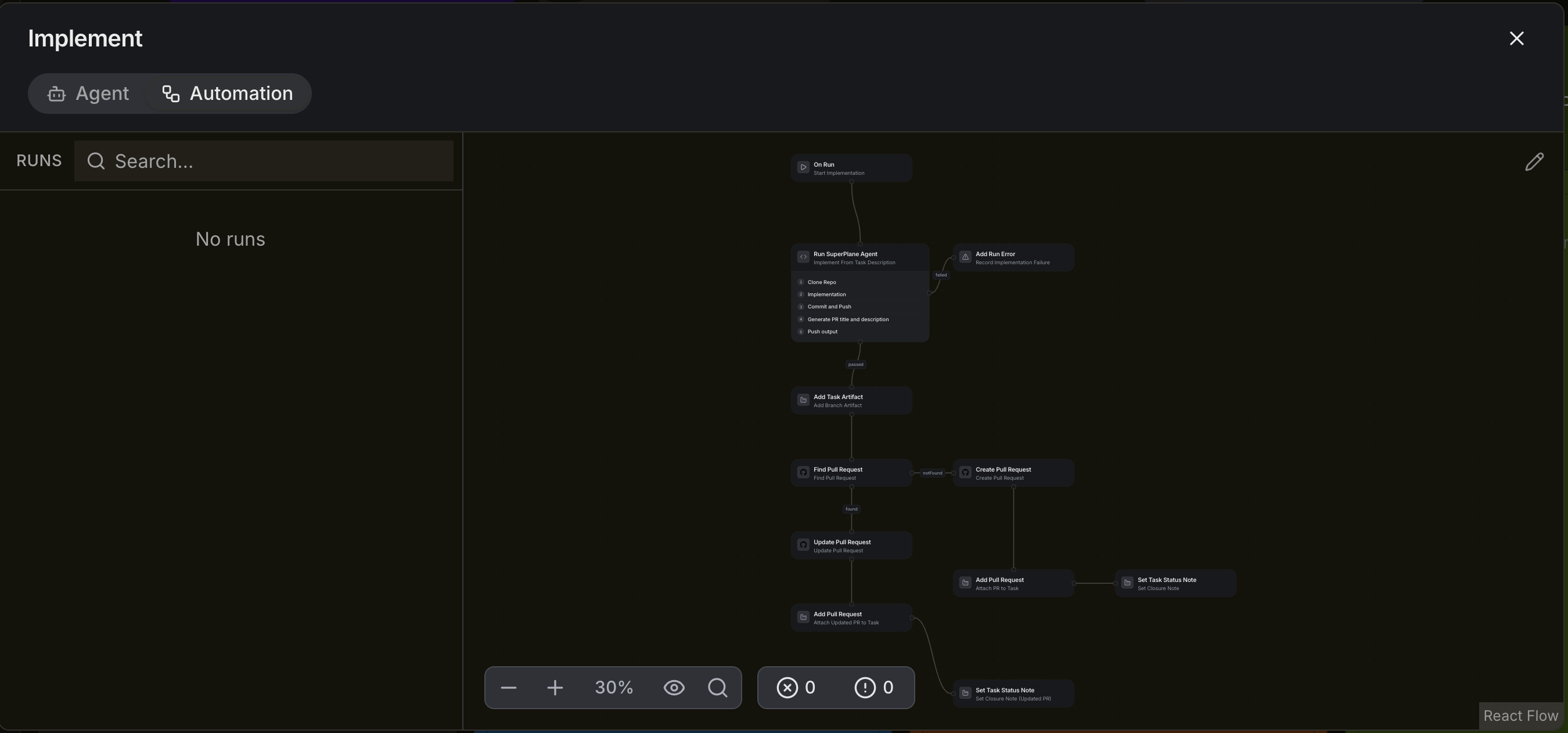
The example canvas handles both cases:
- Run the implementation agent.
- Attach the branch artifact.
- Find an existing pull request for the branch.
- Update it when found or create it when missing.
- Attach the pull request and record a closure note.
This graph makes repeated runs safer. A correction can update the existing pull request rather than opening a duplicate.
Design the failure path before increasing volume
Section titled “Design the failure path before increasing volume”Connect the agent’s failure output to a node that records the error. Preserve the task, run and relevant logs so a person can distinguish a transient service failure from a code failure.
Do not retry unchanged work without a reason. Retry a temporary provider error. Return a failing test through Verify. Pause when credentials are missing or the task requires a product decision.
Spend model usage where it improves the result
Section titled “Spend model usage where it improves the result”Implementation is usually the most expensive stage because it can combine model tokens and machine time. Keep the task narrow and let deterministic components handle repository bookkeeping.
- Use the smallest model that can complete this class of work reliably.
- Pass the relevant task context instead of every prior message.
- Run focused checks during implementation and reserve the full required suite for Verify.
- Limit parallel tasks when they touch the same repository or environment.
- Compare cost per accepted pull request across similar task types.
Continue to Verify automation to process checks and review feedback.