
Software Factory fundamentals
Backlog automation
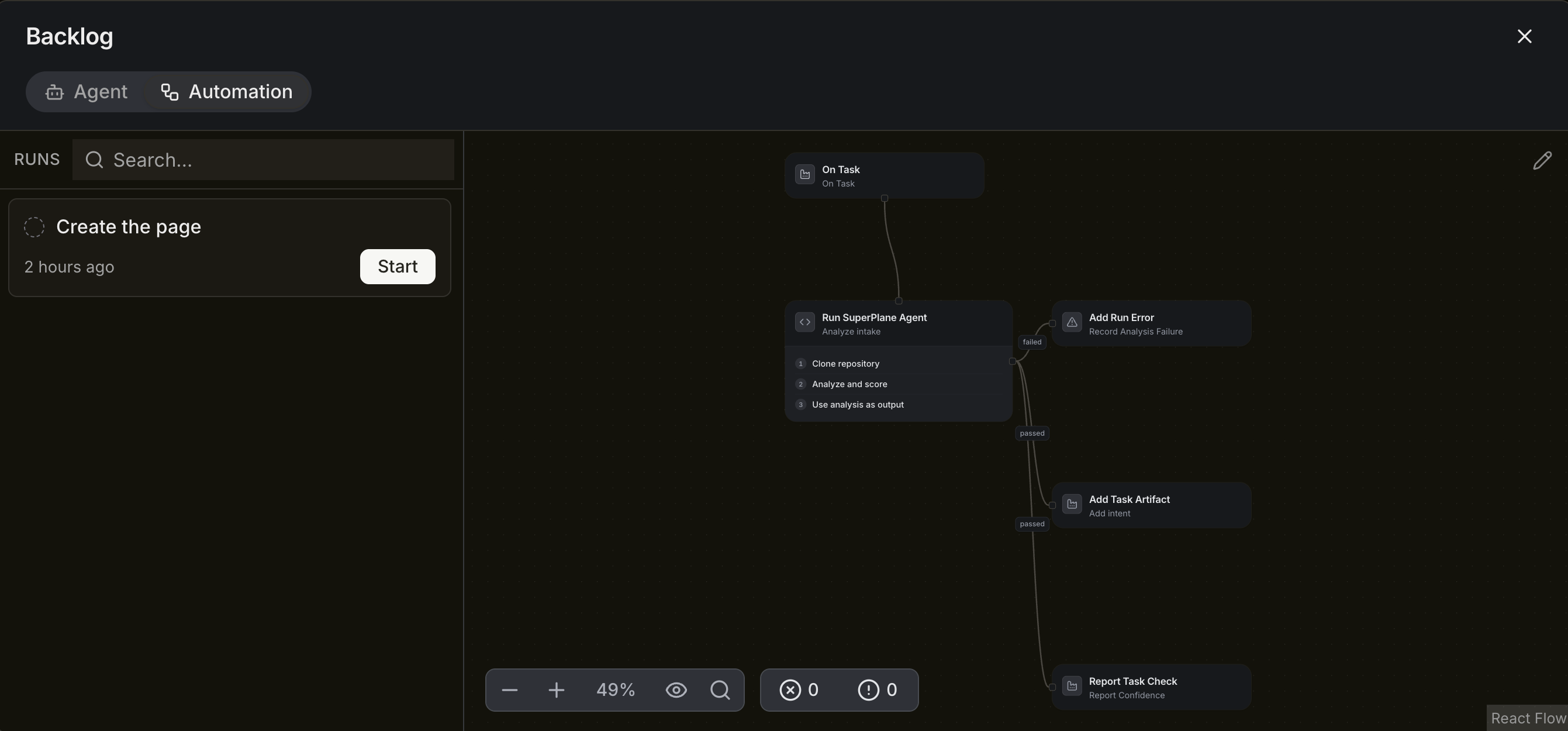
Customize how the Factory imports, enriches and qualifies incoming work.The Backlog automation turns an incoming issue or manual request into a task the Factory can evaluate. Customize it to collect the right context, report confidence and keep unclear work out of implementation.
Decide what enters the backlog
Section titled “Decide what enters the backlog”Start with the event that represents work for your team. GitHub issues are a common source but a custom Factory can listen to another source-control system, issue tracker, webhook or manual task.
Filter early when the source contains work the Factory should never consider. Repository, project, label and issue state are reliable routing signals. Keep product judgment in the source process instead of asking an agent to infer whether every issue belongs in scope.
Browse source control and work intake for supported issue and repository services.
Give the analysis enough context
Section titled “Give the analysis enough context”The analysis agent should receive the task description and the repository context needed to assess it. Ask for a structured result that downstream nodes can use. Useful fields include:
- a short statement of the requested outcome
- the likely code area or repository
- missing information that blocks implementation
- a confidence result with a brief reason
- a recommendation to start or ask for clarification
Avoid sending an entire repository or unrelated issue history into every scoring run. A smaller input reduces cost and makes the reason for the result easier to inspect.
Route every result deliberately
Section titled “Route every result deliberately”The example canvas uses separate routes after the agent:
- Passed: Attach the analysis as a task artifact and report the confidence check.
- Failed: Record the run error so the task shows why analysis did not finish.
Add a human route when a low-confidence task needs a decision. A person can improve the source issue, narrow its scope or reject it before implementation spends model and machine usage.
Keep the start decision visible
Section titled “Keep the start decision visible”Scoring helps sort work but it should not silently authorize every change. Keep the Start action when your team wants to review tasks before code execution. If you automate that decision, define a narrow rule such as a trusted repository, an approved label and a confidence threshold.
Control backlog cost
Section titled “Control backlog cost”Backlog analysis runs once for every matching request, so small choices multiply quickly.
- Filter unsupported work before an agent node.
- Use a smaller model for classification when it produces a reliable structured result.
- Limit the repository context to files and metadata needed for scoring.
- Do not rerun analysis until the task or its context changes.
- Record the reason for rejection so a person can fix the request without another exploratory run.
Once the task is approved, Implement automation controls the code work.